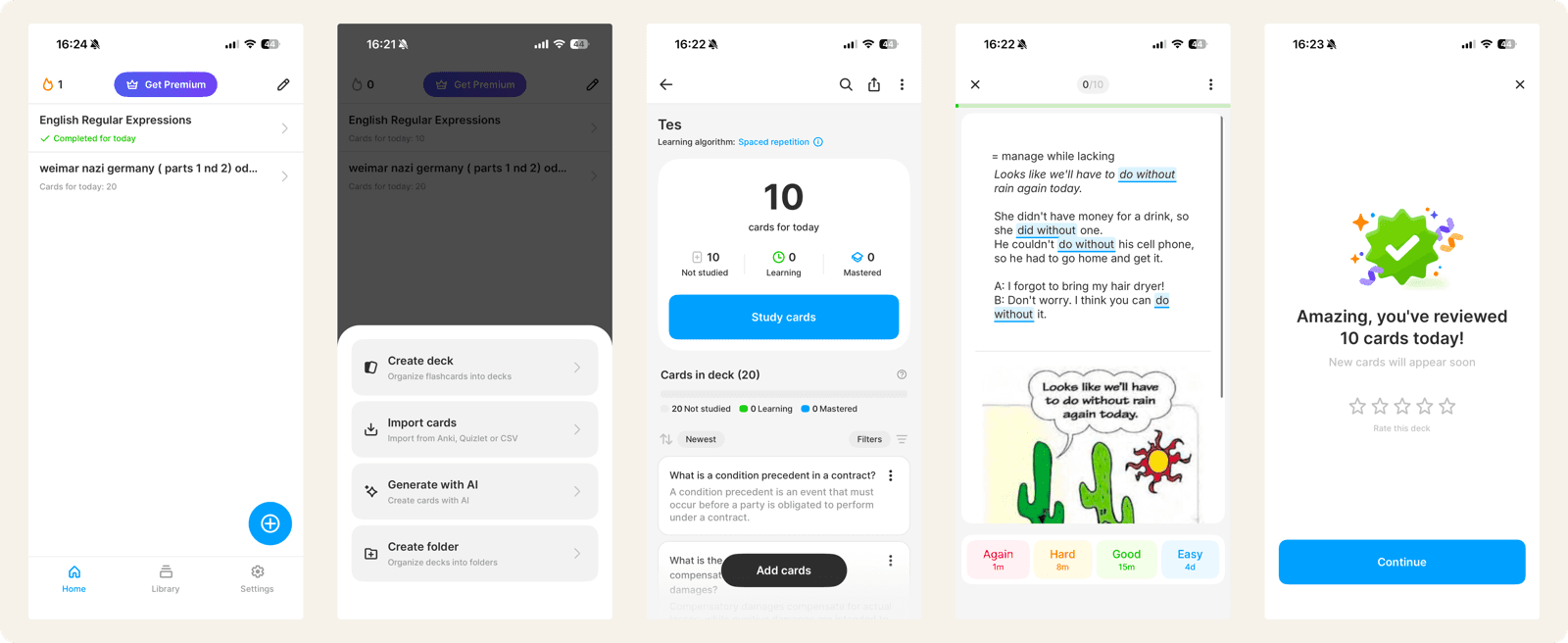
Noji (formerly AnkiPro) is a modern flashcard app with a polished interface, multiple study modes, and a library of over 50,000 pre-made decks. It is available across iOS, Android, and web, and is designed to make flashcard studying feel approachable for mainstream students.
Sticky takes a different approach. Instead of being a broad study platform with many modes, it focuses on two things: using AI to create flashcards instantly from your notes, and using spaced repetition to schedule reviews for long-term retention.
Both are modern flashcard apps with clean designs. But they solve different problems. Noji is best for students who want a polished cross-platform experience with pre-made decks and multiple study modes. Sticky is best for students who want AI card creation from their own notes and true spaced repetition with no card limits or paywalls. This guide breaks down exactly how they compare.
Quick Verdict
you want a polished cross-platform flashcard app with 50,000+ pre-made decks, multiple study modes like writing review and multiple choice, and built-in collaboration features.
you want AI to create flashcards from your own notes instantly, and you want true spaced repetition scheduling with no daily card limits or feature restrictions.
What Is Noji?
Noji is a cross-platform flashcard app developed by Vedas Apps. Originally launched as AnkiPro, it rebranded to Noji in 2025. Despite the original name, it is not affiliated with the open-source Anki project.
The app is built around a modern, visually appealing interface with multiple study modes: traditional flashcard review, writing review, multiple choice, and audio playback. Noji also offers image occlusion, fill-in-the-blank cards, and AI card generation from prompts and PDFs. Its library of over 50,000 pre-made decks covers languages, sciences, and other subjects.
Noji operates on a freemium model. The free tier allows studying up to 50 cards per day. Noji Premium unlocks unlimited cards, AI generation, image occlusion, custom algorithm presets, offline learning, and rich text editing. Premium costs $4.99 per month, $17.99 per year, or $74.99 for lifetime access.
What Is Sticky?
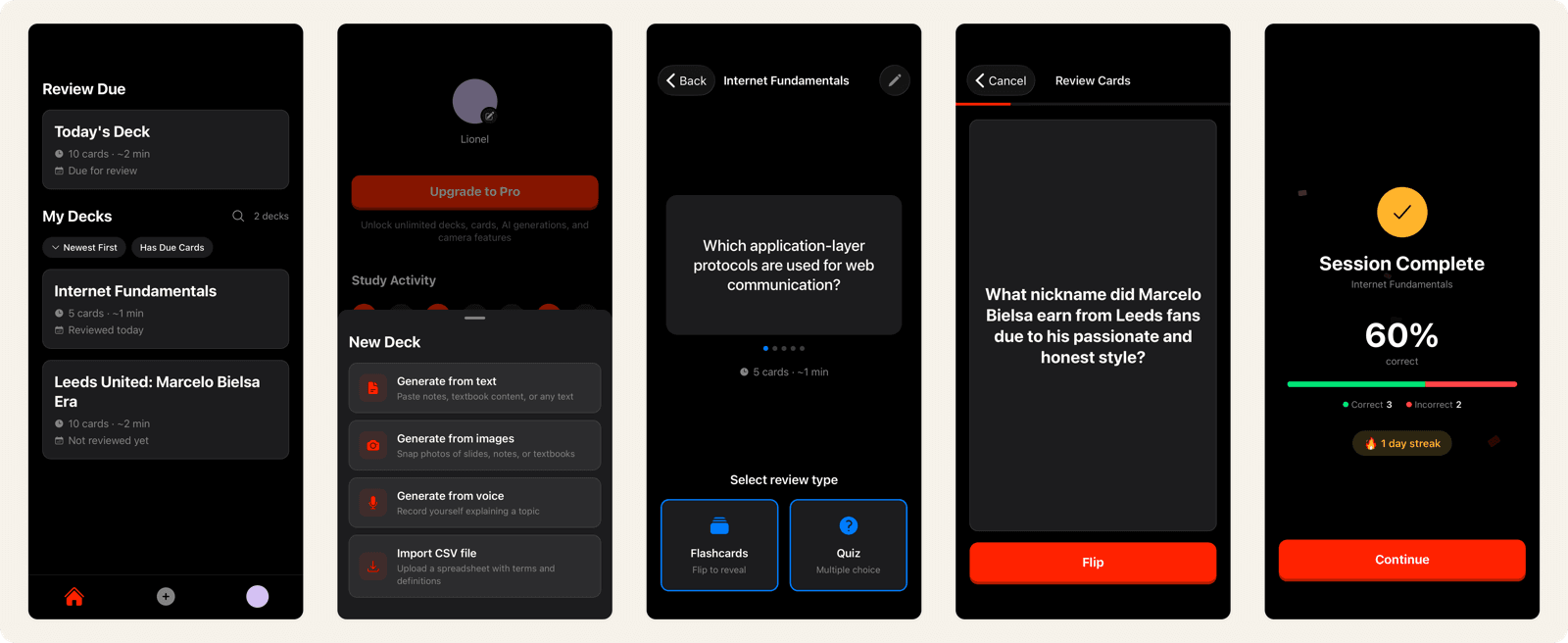
Sticky is an iOS flashcard app designed around two core ideas: AI-powered card creation and spaced repetition scheduling.
Instead of typing out flashcards manually or browsing a library, you take a photo of your notes, textbook, or whiteboard and Sticky's AI generates a full deck of flashcards in seconds. You can also paste text directly using the Note to Card feature. The entire workflow is built around turning your own material into flashcards as quickly as possible.
Once cards are created, Sticky's SM-2 spaced repetition algorithm takes over. It tracks your performance on every card individually and schedules reviews at expanding intervals, showing you cards right before you would forget them. There are no daily card limits and no features locked behind a paywall.
Noji Features vs Sticky: Side-by-Side Comparison
Here is how Noji and Sticky compare across the features that matter most for studying.
| Feature | Noji | Sticky |
|---|---|---|
| Spaced repetition | SM-2 (custom presets, Premium only) | SM-2 algorithm, built into every review |
| Card creation | Manual, AI from prompts/PDFs (Premium) | AI from photos, text, and voice, plus CSV import |
| AI features | Prompt-based generation, PDF import (Premium) | Photo to Card, Note to Card (included) |
| Study modes | Flashcards, writing, multiple choice, audio | Spaced repetition review, Quiz mode |
| Pre-made content | 50,000+ community decks | Curated subject decks |
| Platforms | iOS, Android, web, desktop | iOS |
| Offline access | Premium only | No |
| Daily card limit | 50 cards (free), unlimited (Premium) | No limit |
| Pricing | Free (limited) / $17.99 per year | Free with premium options |
| Ads | Upgrade prompts on free tier | No ads or upgrade prompts |
Noji Card Creation vs Sticky: Prompts and PDFs vs Photos of Your Notes
Both Noji and Sticky offer AI-powered card creation, but they approach it differently.
Noji Premium lets you generate flashcards by typing a prompt (for example, "Create 20 cards about the French Revolution") or by uploading a PDF. The AI creates cards based on your input, and an "Improve Prompt" feature helps refine results. Manual card creation is also available with rich text editing, images, and LaTeX support on Premium.
Sticky's AI starts with your actual study material. You take a photo of your lecture notes, textbook, or whiteboard, and the AI extracts key concepts and generates question-answer pairs. You can also paste text directly. The difference is that Sticky works from what you are physically studying, not from a text prompt describing what you want to learn.
This matters because cards generated from your specific notes are more likely to match what your professor emphasises and what will appear on your exam. Research on effective flashcard design suggests that engaging with your own material during card creation aids learning. Noji's prompt-based approach is more flexible but less connected to your actual study context.
Noji Spaced Repetition vs Sticky: Free Access vs Paywalled Presets
Both apps use the SM-2 spaced repetition algorithm, but they differ significantly in how much of it is available for free.
Sticky includes full SM-2 scheduling in every review session. When you rate a card Easy, Medium, or Hard, the algorithm calculates the optimal next review date. Every card is tracked individually. There are no restrictions on how many cards you can review per day, and the algorithm works the same whether or not you pay.
Noji includes basic spaced repetition on the free tier but caps daily studying at 50 cards. Custom algorithm presets — tailored settings for language learning, medical study, or other goals — require Premium. This means free users cannot adjust their review intervals or optimise scheduling for their specific use case.
The 50-card daily limit is the most significant difference. If you are studying multiple subjects with hundreds of cards, 50 per day is a real constraint. Sticky has no daily limit, so your review schedule is determined entirely by the algorithm, not by an artificial cap.
Noji Study Modes vs Sticky: Variety vs Focus
Noji offers several study modes: traditional flashcard review, writing review (type your answer), multiple choice, and audio playback. These modes add variety and can make study sessions feel less repetitive. Fill-in-the-blank and reverse cards let you test knowledge in different directions.
Sticky focuses on two modes: spaced repetition review (the core study loop) and Quiz mode. Rather than offering many ways to interact with cards, it optimises the one method with the strongest evidence base: active recall through spaced retrieval practice.
This is a genuine trade-off. If you find variety keeps you motivated and you enjoy testing yourself in different formats, Noji's multiple modes are an advantage. If you want every study minute optimised for long-term retention, Sticky's focused approach is more efficient.
Noji Pricing vs Sticky: What You Actually Pay
Noji's free tier gives you basic flashcard review capped at 50 cards per day. To unlock unlimited cards, AI generation, image occlusion, custom algorithm presets, offline learning, and rich text editing, you need Noji Premium at $4.99 per month, $17.99 per year, or $74.99 for lifetime access.
Sticky is free to download with core features included. AI card creation, spaced repetition scheduling, and offline access are available without a subscription. There are no ads and no upgrade prompts during study sessions.
The key difference is what is included for free. Noji restricts several core study features to Premium, including the daily card limit and offline access. Sticky includes its core functionality — AI card creation and full spaced repetition — without restrictions.
Who Should Use Noji
Noji is a strong choice if:
- You want a polished, cross-platform experience. Noji works on iOS, Android, web, and desktop with a modern interface and seamless syncing across all devices.
- You want pre-made decks. With over 50,000 community decks, there is likely content for your course or subject already available.
- You like variety in study modes. Writing review, multiple choice, and audio modes offer different ways to engage with your material.
- You study with others. Noji's deck sharing with customisable permissions and teacher tools make it strong for collaborative study and classroom use.
Who Should Use Sticky
Sticky is a strong choice if:
- You want to study your own material without manual entry. If you have lecture notes, textbook pages, or handwritten notes, Sticky turns them into flashcards in seconds with AI.
- You need long-term retention. For subjects where you need to remember material for months or years, Sticky's SM-2 algorithm is purpose-built for durable memory.
- You do not want daily card limits. Sticky lets you review as many cards as the algorithm schedules, with no artificial restrictions.
- You prefer a distraction-free experience. No ads, no upgrade prompts, no feature gates during study sessions. Just your cards and a schedule.
- You are an iOS user who studies on mobile. Sticky's camera-to-card workflow is built around how students actually capture information. It also offers curated decks for subjects like AP Biology and SAT Math if you want to start studying right away.
Is Sticky the Best Noji Alternative?
Noji and Sticky are both modern flashcard apps with clean designs, but they prioritise different things. Noji is a cross-platform study tool with a large deck library, multiple study modes, and collaboration features. Sticky is a focused learning tool built around AI card creation and unrestricted spaced repetition.
If you want to browse pre-made decks, study in multiple modes, and use a polished app across every device, Noji does that well.
If you want to turn your own notes into flashcards instantly and review them on an evidence-based schedule without daily card limits or paywalled features, that is exactly what Sticky is built for.
The best choice depends on how you study and what you value most. If pre-made content and cross-platform access matter, Noji is a solid option. If you want to study your own material with AI-powered card creation and true spaced repetition built in from day one, Sticky is the more focused tool for that job. Explore more study guides and learning science to find the approach that works best for you.