Anki is the gold standard of spaced repetition software. It has been around since 2006, it is open-source, and it has one of the most dedicated user communities in education — particularly among medical students and language learners.
Sticky takes the same core science and wraps it in a different experience. Instead of manual card creation and deep customisation, it focuses on two things: using AI to create flashcards instantly from your notes, and delivering spaced repetition through a clean, mobile-first interface.
Both apps are built on spaced repetition. But they are designed for very different types of learners. Anki is best for power users who want total control over their study system and access to a massive ecosystem of add-ons and shared decks. Sticky is best for students who want AI card creation and true spaced repetition without spending hours learning how to configure their tools. This guide breaks down exactly how they compare.
Quick Verdict
you want full control over every aspect of your flashcard system, access to thousands of add-ons, and a massive library of community-shared decks — especially for medical school.
you want AI to create flashcards from your own notes instantly, and you want true spaced repetition in a clean, mobile-first app without a steep learning curve.
What Is Anki?
Anki is a free, open-source flashcard application built around spaced repetition. Created by Damien Elmes in 2006, it has become the most widely used SRS tool in the world, particularly in medical education where over 86% of American medical students report using it.
The core experience is creating or downloading flashcard decks, then reviewing them on a schedule determined by Anki's spaced repetition algorithm. Anki supports multiple card types including basic, cloze deletion, and image occlusion. Its real power comes from deep customisation: users can control card templates with HTML and CSS, adjust dozens of scheduling parameters, and extend functionality through nearly 2,000 community-built add-ons.
Anki is free on desktop and Android. The iOS app, AnkiMobile, costs $24.99 as a one-time purchase, which funds the lead developer's full-time work on the project. All platforms sync through AnkiWeb.
What Is Sticky?
Sticky is an iOS flashcard app designed around two core ideas: AI-powered card creation and spaced repetition scheduling.
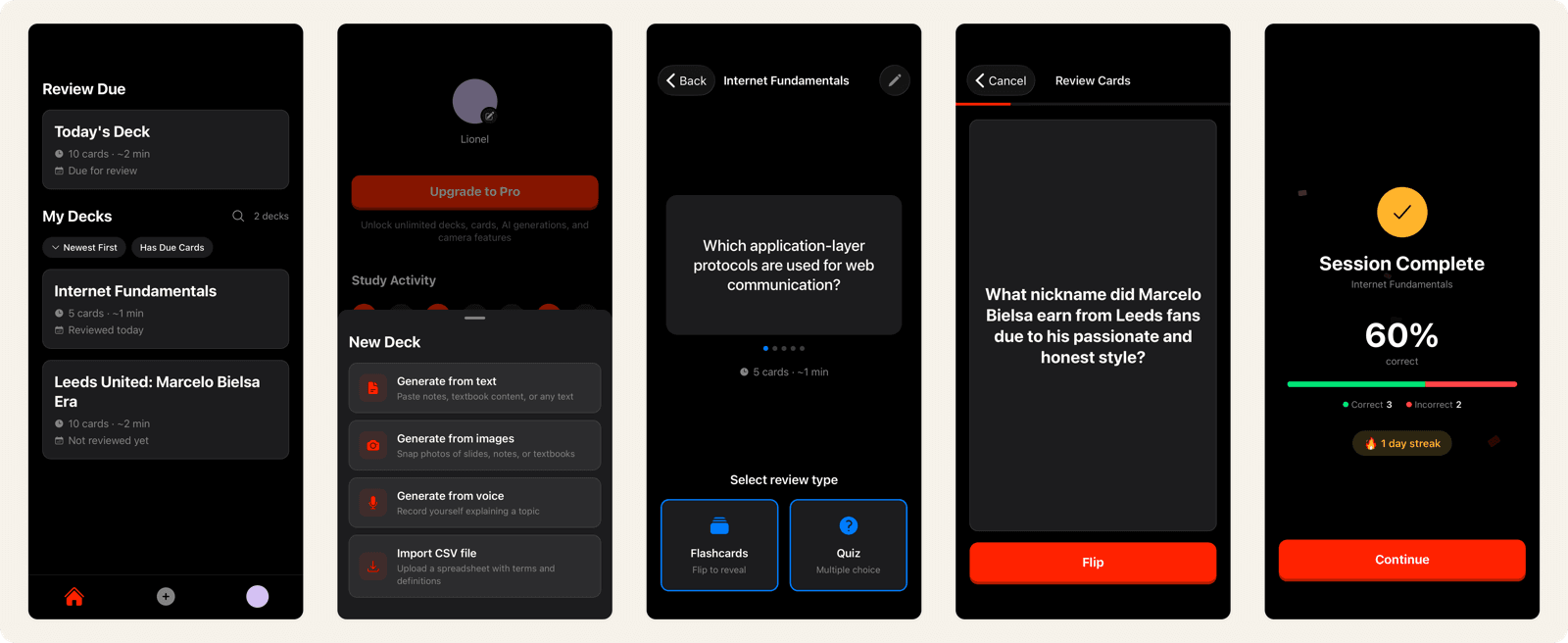
Instead of typing out flashcards manually or configuring templates, you take a photo of your notes, textbook, or whiteboard and Sticky's AI generates a full deck of flashcards in seconds. You can also paste text directly using the Note to Card feature. The goal is to eliminate the hours of manual card creation that keep many students from using spaced repetition at all.
Once cards are created, Sticky's SM-2 spaced repetition algorithm schedules your reviews automatically. It tracks your performance on every card individually and shows you material right before you would forget it, building durable long-term memory.
Anki Features vs Sticky: Side-by-Side Comparison
Here is how Anki and Sticky compare across the features that matter most for studying.
| Feature | Anki | Sticky |
|---|---|---|
| Spaced repetition | SM-2 default, FSRS optional | SM-2 algorithm, built into every review |
| Card creation | Manual typing, HTML/CSS templates | AI from photos, text, and voice, plus CSV import |
| AI features | None built in (add-ons available) | Photo to Card, Note to Card (included) |
| Card types | Basic, cloze, image occlusion, custom | Front/back, AI-generated Q&A pairs |
| Customisation | Full HTML/CSS, 2,000+ add-ons | Clean defaults, minimal configuration |
| Pre-made content | Massive shared deck library | Curated subject decks |
| Platforms | Desktop, iOS ($24.99), Android, web | iOS |
| Offline access | Yes | No |
| Math & equations | MathJax built-in, legacy LaTeX manual | Full LaTeX rendering |
| Pricing | Free (desktop/Android), $24.99 iOS | Free with premium options |
Anki Spaced Repetition vs Sticky: Same Science, Different Approach
Both Anki and Sticky are built on the SM-2 algorithm, the spaced repetition system originally developed for SuperMemo. This is the core similarity between the two apps, and it is significant: both use an evidence-based approach to scheduling reviews for long-term retention. The algorithm is designed to schedule each card just before you would forget it, working directly against the forgetting curve that causes most studied material to vanish from memory within days.
Where they differ is in how much control you have over the algorithm. Anki lets you adjust dozens of parameters: learning steps, graduating intervals, ease factors, maximum intervals, and more. It also offers FSRS (Free Spaced Repetition Scheduler), a newer machine learning-based algorithm that personalises review intervals based on your individual memory patterns. Users report FSRS reduces daily review count by 20-30% compared to SM-2.
Sticky uses SM-2 with sensible defaults. When you review a card and rate it Easy, Medium, or Hard, the algorithm calculates the optimal next review date. You do not need to understand ease factors or configure learning steps. The algorithm works the same way — it just requires zero setup.
This is the fundamental trade-off between the two apps. Anki gives you a laboratory where you can tune every variable. Sticky gives you a tool that works out of the box. If you enjoy optimising your study system and are willing to invest time learning the settings, Anki's depth is unmatched. If you want to start studying immediately and trust the algorithm to handle scheduling, Sticky removes the friction.
Anki Card Creation vs Sticky: Manual Entry vs AI from Your Notes
This is where the two apps differ most in daily use.
Anki's card creation is manual and powerful. You choose a note type, fill in fields, and optionally format cards with HTML and CSS. Power users build elaborate templates with colour-coded cloze deletions, embedded audio, and conditional formatting. The quality ceiling is very high, but so is the time investment. Creating a deck of 100 well-formatted cards can take hours.
Many Anki users skip card creation entirely by downloading shared decks. In medical education, decks like AnKing cover entire curricula and are continuously updated by the community through platforms like AnkiHub. For language learners, pre-made frequency decks cover thousands of words.
Sticky's approach starts with AI. The primary card creation method is taking a photo of your study material and letting the AI extract key concepts and generate question-answer pairs. No typing, no template configuration, no HTML. A chapter of notes becomes a study deck in seconds.
The trade-off is genuine. Anki's manual process and shared decks produce highly polished, community-vetted cards. Sticky's AI process produces cards faster from your specific material but with less formatting control. Research on effective flashcard design suggests that both approaches can be effective — the best cards are the ones you actually review.
Anki Customisation vs Sticky: Power User Playground vs Clean Defaults
Anki's customisation is its defining feature and its biggest barrier. Nearly 2,000 add-ons let you extend the app in almost any direction: review heatmaps, text-to-speech, advanced browser tools, collaborative deck editing, and more. Card templates support full HTML and CSS, meaning users can create visually rich, interactive cards.
This flexibility comes at a cost. Anki's learning curve is consistently its most cited weakness. New users face concepts like note types versus card types, fields, deck options with dozens of parameters, and a desktop-first interface that many describe as dated. It is not uncommon for students to spend weeks learning Anki before feeling comfortable with it.
Sticky takes the opposite approach. The interface is designed to be understood in minutes. There are no note types to configure, no deck options to tune, no add-ons to install. You create cards (manually or with AI), review them on schedule, and the algorithm handles the rest.
This is a genuine trade-off that depends on how you study. If you want to build a highly personalised study system and are willing to invest the setup time, Anki rewards that investment. If you want to go from notes to studying in under a minute, Sticky's simplicity is the point.
Anki LaTeX vs Sticky: Math & Equation Support
Both Anki and Sticky support LaTeX for rendering mathematical and scientific notation on flashcards — a feature that most flashcard apps lack entirely. But the experience of using LaTeX differs significantly between the two.
Anki offers two methods for rendering equations. The recommended approach is MathJax, which is built into Anki 2.1+ and works without any additional installation. You wrap equations in \( \) for inline math or \[ \] for display math, and they render in the reviewer. The older method uses native LaTeX, which requires installing a full LaTeX distribution (MiKTeX on Windows, MacTeX on Mac) on your computer. Native LaTeX is disabled by default for security reasons — LaTeX code can execute system commands — and many users report difficulty getting it to work at all.
Even with MathJax, there is no visual equation editor. You type raw LaTeX syntax directly into the card editor, and you only see the rendered output when you preview or review the card. For users comfortable with LaTeX, this is fine. For students encountering LaTeX for the first time, the learning curve adds another layer on top of Anki's already steep setup process. Forum threads about LaTeX not rendering are among the most common support requests in the Anki community.
Sticky supports LaTeX rendering without requiring any local software installation or configuration. You type LaTeX syntax and see properly formatted equations on your cards — fractions, integrals, Greek letters, matrices, and chemical notation all render correctly. The difference is not in what you can render (both apps handle standard LaTeX) but in how much setup is required to get there.
If you are already an Anki power user with MathJax configured, both apps give you comparable equation support. If you are a STEM student who wants equation-capable flashcards without installing software or troubleshooting rendering issues, Sticky removes that friction. For more on creating equation-based cards, see our guide to LaTeX math flashcards.
Anki Pricing vs Sticky: What You Actually Pay
Anki is free and open-source on desktop (Windows, Mac, Linux) and Android. AnkiWeb for browser-based review is also free. The iOS app, AnkiMobile, costs $24.99 as a one-time purchase with no subscription and no in-app purchases. This price funds the lead developer's full-time work on the entire Anki ecosystem.
Sticky is free to download with core features included. There are no ads on any tier. AI card creation and spaced repetition scheduling are available without a subscription.
For desktop and Android users, Anki is completely free. For iOS users, the $24.99 one-time cost compares favourably to subscription-based alternatives over time, though it is a higher upfront commitment than most flashcard apps.
Who Should Use Anki
Anki is a strong choice if:
- You want total control over your study system. If you enjoy configuring templates, tweaking algorithm parameters, and building a personalised workflow, no other flashcard app offers this level of depth.
- You are a medical student. Anki is deeply embedded in medical education culture. Pre-made decks like AnKing cover entire curricula, and the community support for medical Anki use is unmatched.
- You study on desktop. Anki's desktop app is its strongest platform, with full add-on support and the best card creation experience.
- You want FSRS. If you want a cutting-edge ML-based spaced repetition algorithm that adapts to your individual memory patterns, Anki with FSRS is currently the best option available.
- You value open-source and data ownership. Your data is stored locally, the code is open, and there is no risk of a company changing pricing or shutting down.
Who Should Use Sticky
Sticky is a strong choice if:
- You want to study your own material without hours of card creation. If you have lecture notes, textbook pages, or handwritten notes, Sticky turns them into flashcards in seconds with AI.
- You want spaced repetition without the learning curve. Sticky gives you the same SM-2 algorithm that powers Anki, with zero configuration required.
- You prefer a clean, mobile-first experience. No cluttered settings, no add-on management, no HTML templates. Just your cards and a schedule.
- You are new to spaced repetition. If the idea of active recall and spaced repetition appeals to you but Anki feels intimidating, Sticky is a more accessible entry point to evidence-based studying.
- You study on the go. Sticky's camera-to-card workflow is built around how students actually capture information: in class, at a desk, on a commute. It also offers curated decks for popular subjects like AP Biology and Spanish vocabulary if you want a head start.
Is Sticky the Best Anki Alternative?
Anki and Sticky share the same foundation — spaced repetition science — but they are built for different kinds of learners. Anki is a professional-grade tool with unmatched depth and a massive ecosystem. Sticky is a focused app that makes spaced repetition accessible to everyone.
If you want full control over every aspect of your study system, a huge library of shared decks, and the ability to customise anything with add-ons, Anki is the right choice. It has earned its reputation over nearly two decades.
If you want to turn your own notes into flashcards instantly and start reviewing with a proven algorithm in under a minute, that is exactly what Sticky is built for. You get the same spaced repetition science without the setup cost.
The best choice depends on how much time you want to spend on your tools versus your actual studying. Many students try Anki, appreciate the science behind it, but find the complexity a barrier to consistency. Sticky exists for those students — same evidence-based approach, dramatically lower friction. Explore more study guides and learning science to find the method that works best for you.